|
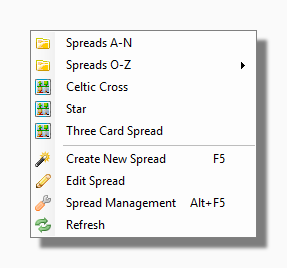
The top section of the My Spreads menu is different for every user because it shows the spreads which are installed in your own unique Spreads Folder. Your Spreads Folder can also contain subfolders which can contain spreads or more subfolders and so on.
Below the folders come any spreads that are loose in your top level Spreads Folder. Just click on a spread to deal it out using the current deck or any specific decks defined for the spread in question.
Create New Spread This launches the Spreads Wizard in Create New mode.
Edit Spread: Selecting this item lets you browse for an existing Spread and then launches the Spreads Wizard in Edit mode.
Spread Management launches the Spread Management Tool.
Refresh This rebuilds the My Spreads menu. You may wish to use this if you have manually added to or reorganized your Spreads Folder outside the program e.g. using Windows Explorer.
|
|
|